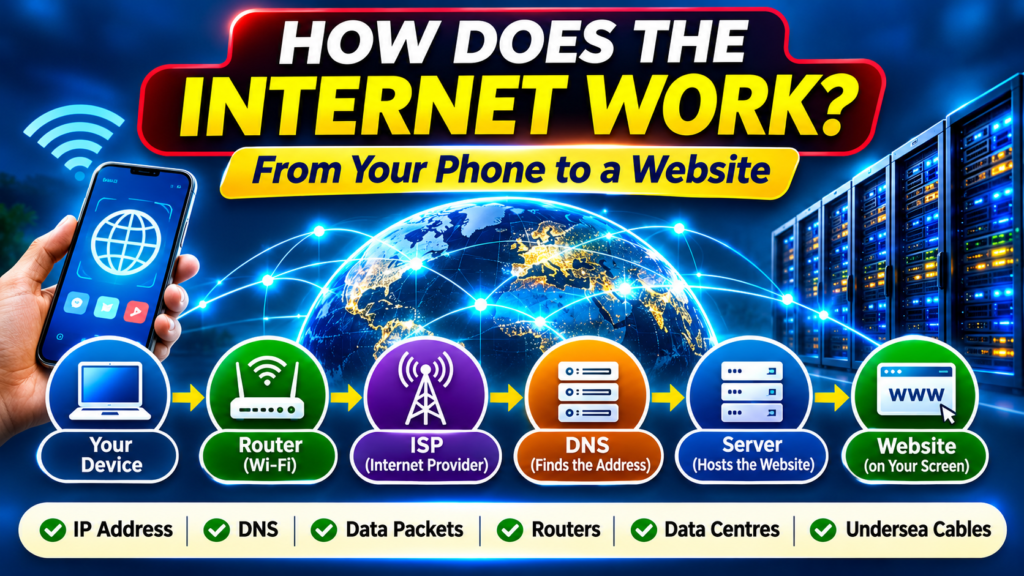
How Does the Internet Actually Work? From Your Phone to a Website
How does the internet work? Every day, billions of people use the internet to send messages, watch videos, read news, shop online, make payments and communicate with others. We connect to Wi-Fi, open a browser, type a website address and expect the page to appear almost instantly.
Understanding how does the internet work helps us appreciate the technology that connects billions of people around the world.
But have you ever wondered what actually happens behind the scenes?
But have you ever wondered what actually happens behind the scenes?
How does a message travel from your smartphone to someone else’s phone? How does your browser find a website when you type its name? Where are websites stored? How does information travel between countries in just a few seconds?
The internet may seem like an invisible technology, but it depends on a huge physical infrastructure made up of cables, routers, servers, data centres, satellites, mobile networks and millions of connected devices.
In this beginner-friendly guide, we will explore how the internet actually works, how websites reach your screen and what happens in the background whenever you go online.
1. What Is the Internet?
The internet is a worldwide network of interconnected computer networks. It allows computers, smartphones, servers and other digital devices to communicate and exchange information.
Think of it as a global transportation system for digital information.
Just as roads connect cities and countries, the internet connects millions of smaller networks around the world.
These networks may belong to:
- Internet service providers (ISPs)
- Businesses and organisations
- Universities and research institutions
- Government agencies
- Mobile network operators
- Individual homes and offices
All these networks communicate using agreed technical rules called protocols.
The important point is that the internet is not one giant computer or a single central network. It is a collection of connected networks that work together.
2. Is the Internet the Same as the World Wide Web?
Many people use the words internet and web as if they mean exactly the same thing. However, they are different.
The Internet is the underlying global network infrastructure that connects devices and networks.
The World Wide Web (WWW) is a service that operates over the internet. It allows people to access websites and web pages using browsers.
For example:
- Visiting a website is using the World Wide Web.
- Sending an email uses the internet but does not necessarily involve the Web.
- Making a voice call through an internet-based application uses the internet.
- Transferring files between computers can also use the internet.
In simple terms, the internet is the road network, while the Web is one type of vehicle travelling on those roads.
Email, online gaming, video calls and other services also use the internet.
3. What Do You Need to Connect to the Internet?
To access the internet, you generally need a device, a network connection and an internet service provider.
Here are the main components.
A. Your Device
This could be:
- Smartphone
- Desktop computer
- Laptop
- Tablet
- Smart television
- Smart home device
Your device runs applications or software that request information from other devices connected to the internet.
B. Modem
A modem connects your home or office network to the technology used by your internet provider.
Depending on the connection type, it may communicate through fibre, cable, telephone infrastructure or another access technology.
In many modern homes, the modem and router are combined into one device.
C. Router
A router connects devices within your home or office network and forwards information between your local network and other networks.
For example, your smartphone, laptop and smart television can all connect to the same router.
The router directs their internet traffic towards the appropriate destination.
Computer chips also play an important role in modern networking devices and servers. Learn more in our guide: What Are Computer Chips? How Do They Work and Where Are They Used?
D. Internet Service Provider (ISP)
An Internet Service Provider is a company or organisation that provides access to the internet.
In Bangladesh, people commonly access the internet through broadband providers and mobile network operators.
An ISP connects your home or mobile network to other networks across the internet.
E. Network Cables and Wireless Connections
Information travels through different physical and wireless technologies, including:
- Fibre-optic cables
- Ethernet cables
- Undersea communication cables
- Mobile networks
- Wi-Fi
- Satellite communication links
These technologies make it possible to connect devices across cities, countries and continents.
To understand how does the internet work, we must look at how routers, servers and network connections cooperate to deliver information.
4. How Does Your Device Connect to the Internet?
There are several ways to connect to the internet.
Wi-Fi
Wi-Fi allows devices to connect wirelessly to a nearby router or wireless access point.
For example, when you connect your smartphone to your home Wi-Fi network, your phone communicates with the router using radio signals.
The router then forwards internet traffic through your broadband connection.
Remember, Wi-Fi and the internet are not the same thing. Wi-Fi is a wireless networking technology. It can connect devices to a local network even when that network has no internet access.
Mobile Data
Mobile data connects your smartphone to the internet through a mobile network.
Your phone communicates wirelessly with a nearby mobile base station. The mobile operator’s network then carries your traffic towards its destination.
Technologies such as 4G and 5G provide mobile internet connectivity.
Fibre-Optic Broadband
Fibre-optic broadband uses extremely thin strands of glass or plastic to transmit information as pulses of light.
It can carry large amounts of data over long distances and is widely used for high-speed internet connections.
Satellite Internet
Satellite internet provides connectivity through communication satellites.
It can be useful in remote locations where fibre or other terrestrial connections are difficult to establish. Its performance depends on the satellite system, location and network conditions.
5. What Is an IP Address?
Every device communicating over the internet uses an Internet Protocol (IP) address.
An IP address is a numerical address used to identify a network interface and help route information to the correct destination.
There are two main versions:
IPv4: Uses four groups of numbers separated by dots. For example, 192.0.2.10.
IPv6: Uses a longer hexadecimal address format, such as 2001:db8::10.
You do not need to remember these addresses when visiting ordinary websites. Your browser and network software handle much of the process automatically.
Your home router may also use private IP addresses for devices inside your local network, while your internet connection uses a public IP address for communication with the wider internet.
An IP address is an important part of internet communication, but it does not necessarily identify a person or a precise physical location.
6. What Is DNS and Why Is It Important?
Imagine having to remember a long numerical IP address every time you wanted to visit a website.
That would be difficult.
This is why the internet uses the Domain Name System, commonly known as DNS.
DNS works like an internet address book. It helps translate human-readable domain names into the IP addresses needed to locate internet services.
For example, when you type a website name such as hkmanik.com into your browser, your device needs to find the appropriate IP address.
A simplified DNS process works like this:
- You enter a domain name in your browser.
- Your device checks whether it already knows the required address.
- If necessary, it sends a DNS query to a DNS resolver.
- The resolver finds the relevant DNS information, possibly by asking other DNS servers.
- The resolver returns the available IP address information.
- Your browser can then attempt to connect to the website’s server.
DNS information is often cached, which means it can be reused for a period of time instead of being looked up from the beginning every time.
This makes browsing faster and reduces unnecessary DNS queries.
Without DNS, people would have a much harder time using websites.
7. What Are Data Packets?
One of the most interesting things about the internet is that information usually does not travel as one enormous piece.
Instead, digital information is divided into smaller units called packets.
Imagine sending a large book to another country. Rather than sending the entire book as one package, you divide it into smaller parcels. Each parcel carries information that helps it reach the correct destination.
Internet communication uses a similar principle.
A packet generally contains:
- A portion of the information being transmitted
- Source and destination information
- Other technical details needed for delivery
Packets may travel through different network paths before reaching their destination.
The receiving device or system processes them according to the relevant protocol.
For many applications, the receiving side can reassemble the information into its original form.
This packet-based approach allows networks to share communication links efficiently.
It also helps information travel across a large network of interconnected systems.
8. What Are Routers and How Do They Work?
A router is a networking device that forwards data between different networks.
When you request a website, your data does not necessarily travel directly from your home to the website’s server.
It may pass through several routers operated by your internet provider and other network operators.
Each router examines information in the packet and decides where to forward it next.
Think of a router as a traffic controller at a road junction.
It examines the destination and directs traffic towards an appropriate route.
Routers are essential because the internet consists of many separate networks that must communicate with one another.
If a particular network path becomes unavailable, routing systems may be able to send traffic through another available path.
9. What Are Internet Servers and Data Centres?
A server is a computer or software system that provides services or information to other computers.
When you visit a website, your browser usually requests information from a web server.
The server may provide:
- Website pages
- Images
- Videos
- Documents
- Application data
- Other digital resources
Many websites use computers housed in large facilities called data centres.
A data centre contains servers, storage systems, networking equipment, power systems and cooling infrastructure.
These facilities are designed to operate reliably and support large amounts of digital activity.
Some websites operate their own servers, while others rent hosting services from specialised providers.
Large online services may use multiple data centres in different locations to improve performance and availability.
10. What Happens When You Type a Website Address?
Now let’s connect all these concepts.
Suppose you open your browser and type:
www.hkmanik.com
What happens next?
Several steps take place, often within seconds.
Step 1: You Enter the Website Address
Your browser receives the domain name you entered.
It needs to find the appropriate internet address for the website.
Step 2: DNS Finds the IP Address
Your device or DNS resolver looks up the domain name and obtains the relevant IP address information.
Step 3: Your Browser Establishes a Connection
Your browser attempts to connect to the destination server.
For a secure website, it also establishes an encrypted connection using HTTPS and TLS.
This helps protect information exchanged between your browser and the website.
Step 4: Your Browser Sends an HTTP Request
Your browser sends a request asking the server for the website’s content.
HTTP stands for Hypertext Transfer Protocol.
It is one of the main protocols used for communication between web browsers and web servers.
Step 5: The Server Processes the Request
The web server receives the request and determines what information should be returned.
For a dynamic website, the server may also communicate with databases or other application services.
Step 6: The Website Data Travels Back
The server sends a response containing the requested information.
This response may include HTML, CSS, JavaScript, images and other resources.
The information travels through network infrastructure in packets.
Step 7: Your Browser Displays the Website
Your browser processes the received files and displays the web page on your screen.
That is why a website can appear on your phone or computer even though its server may be located in another country.
The entire process involves many technologies working together.
11. What Is HTTPS and How Does It Protect You?
When you visit a website, you may notice that its address begins with https:// rather than http://.
The additional letter S stands for Secure.
HTTPS uses encryption through TLS to protect communication between your browser and the website.
It helps provide three important protections:
Encryption: Helps prevent other people from reading information exchanged over the connection.
Integrity: Helps detect whether information has been changed during transmission.
Authentication: Helps your browser verify the identity of the website through its digital certificate.
For example, when you log in to an account or submit information through a secure website, HTTPS helps protect that communication.
However, HTTPS does not automatically mean that a website is trustworthy. A fraudulent website can also use HTTPS.
You should still check the website address and be careful about sharing personal or financial information.
12. How Does Information Travel Between Countries?
You may wonder how a website hosted in one country can be accessed from Bangladesh or another part of the world.
A major part of the answer is international network infrastructure.
The internet uses several types of international connections, including:
- Undersea fibre-optic cables
- Terrestrial fibre networks
- International network exchange points
- Satellite links
- Other specialised communication infrastructure
Undersea fibre-optic cables are especially important.
They run across the ocean floor and connect countries and continents.
These cables transmit enormous amounts of digital information using light signals.
When someone in Bangladesh visits a website hosted in another country, the data may travel through domestic fibre networks, international gateways and undersea cables before reaching its destination.
The return information travels back through the available network routes.
Not every connection follows the same route. The path depends on network arrangements, routing decisions, congestion and other technical factors.
13. Why Do Some Websites Load Faster Than Others?
Have you noticed that some websites open almost instantly while others take several seconds?
There are several reasons.
Internet Connection Speed
A slow broadband or mobile connection can affect how quickly information reaches your device.
Server Performance
A website hosted on an overloaded or poorly configured server may respond slowly.
Distance and Network Routing
The physical and network distance between your device and the server can affect response time.
Website Design
Large images, unnecessary scripts, excessive animations and poorly optimised code can slow down a website.
Caching
Caching stores copies of frequently used information so that it does not always need to be retrieved or generated again.
Content Delivery Networks (CDNs)
A Content Delivery Network stores copies of website resources on servers in multiple locations.
When a visitor requests content, a CDN can often deliver it from a location closer to that visitor.
This can reduce loading time and improve website performance.
14. What Happens When the Internet Stops Working?
The internet depends on many connected systems. A problem in any part of the connection can affect your ability to access websites and online services.
Common causes include:
- Broadband cable damage
- Power failure
- Router or modem problems
- Mobile network outages
- ISP service interruptions
- DNS problems
- Server failures
- International cable disruptions
- Network congestion
If your Wi-Fi is connected but websites are not opening, the problem may be with your internet provider, DNS service or the website itself.
If only one website is unavailable, the problem may be limited to that website or its hosting infrastructure.
The internet is designed with many interconnected networks and alternative routes, but this does not mean every failure can be avoided.
15. Is the Internet Controlled by One Company or Government?
No single company or government owns or controls the entire internet.
The internet is a decentralised system made up of independently operated networks.
Different organisations manage different parts of the infrastructure.
For example:
- ISPs provide internet access.
- Telecom companies operate communication networks.
- Data centre companies provide server infrastructure.
- Domain registrars provide domain registration services.
- Network operators exchange internet traffic.
- Technical organisations develop and coordinate internet standards and resources.
Organisations such as the Internet Corporation for Assigned Names and Numbers (ICANN) help coordinate important parts of the domain name system and the global system of unique internet identifiers.
However, ICANN does not operate every internet network or control all online content.
The internet works because different networks and organisations cooperate using shared technical standards.
16. What Is the Future of the Internet?
Internet technology continues to evolve.
Several developments are shaping how people will connect and communicate in the future.
Faster Mobile Networks
New generations of mobile network technology aim to improve speed, capacity and responsiveness.
Satellite Connectivity
Satellite systems are expanding internet access possibilities in some remote and underserved locations.
Internet of Things (IoT)
More everyday devices are becoming connected to the internet, including home appliances, sensors, vehicles and industrial equipment.
Artificial Intelligence
AI is being used to improve network management, detect unusual activity, automate operations and support online services.
Edge Computing
Edge computing brings some processing and storage closer to the devices or users that need it. This can reduce delays for certain applications.
Better Network Security
As more services move online, protecting networks, devices and personal information becomes increasingly important.
The future internet will likely be faster, more connected and more integrated into everyday life.
17. Why Is Understanding the Internet Important?
The internet is no longer just a technology used by computer professionals.
It is part of education, business, communication, healthcare, banking, entertainment and government services.
Understanding how it works can help ordinary users make better decisions.
For example:
- You can understand why a website sometimes loads slowly.
- You can distinguish Wi-Fi problems from internet connection problems.
- You can understand why domain names and IP addresses are different.
- You can make better decisions about website hosting.
- You can recognise why HTTPS and online security matter.
- You can understand the infrastructure behind digital businesses.
For website owners, freelancers, students and small business operators, this knowledge is particularly useful.
Frequently Asked Questions (FAQ)
1. What is the internet in simple words?
The internet is a worldwide network of connected computer networks that allows devices to communicate and exchange information.
2. Who invented the internet?
The internet developed through the work of many researchers and institutions. Its foundations grew from early packet-switching research and ARPANET, which began operating in 1969. The development of TCP/IP was a major step towards the modern internet.
3. What is the difference between Wi-Fi and the internet?
Wi-Fi is a wireless technology that connects devices to a local network. The internet is the worldwide system of interconnected networks. Wi-Fi can work without internet access.
4. What is an ISP?
An Internet Service Provider is a company or organisation that provides access to the internet through broadband, fibre, mobile or other connection technologies.
5. What is an IP address?
An IP address is a numerical address used by internet-connected devices and networks to identify network interfaces and route data.
6. What is DNS?
DNS stands for Domain Name System. It helps translate human-readable domain names into IP address information so devices can locate internet services.
7. Where is the internet stored?
The internet is not stored in one location. Its information and services are distributed across millions of computers, servers, data centres and other connected systems around the world.
8. Does the internet use undersea cables?
Yes. Undersea fibre-optic cables carry a major share of international data traffic. Satellite and other communication links are also used.
9. Can the internet work without satellites?
Yes. Much of the internet operates through fibre-optic cables, terrestrial networks and other wired infrastructure. Satellites provide additional connectivity, especially in certain remote areas.
10. Is the internet completely secure?
No. The internet provides technologies such as HTTPS and encryption, but users and organisations still face risks such as scams, malware, data theft and unauthorised access.
Now that you understand how does the internet work, you can better appreciate the complex infrastructure behind every website you visit.
Conclusion
The internet may appear to be an invisible service that simply works whenever we open our phones or computers. In reality, it depends on a vast global infrastructure of networks, cables, routers, servers, data centres and communication technologies.
When you visit a website, your device communicates with servers through a series of interconnected networks. DNS helps locate the destination, routers forward information, data packets carry the content, and your browser turns the received information into a web page.
All these processes happen so quickly that we rarely think about them.
Understanding how the internet works helps us appreciate the technology behind modern communication, online business, education and digital services.
The next time you open a website, remember that a remarkable global network is working behind the scenes to bring that page to your screen.
Further Reading and Reliable Sources
- MDN Web Docs – How Does the Internet Work?
- Cloudflare – How Does the Internet Work?
- ICANN – The Domain Name System
- Harvard CS50 – Internet Fundamentals
Need help with your WordPress website?
I build fast, SEO-friendly WordPress websites and online stores for businesses in Bangladesh and beyond.